Pocket DAB/DAB+ & FM Radio with Bluetooth, MP3, LCD
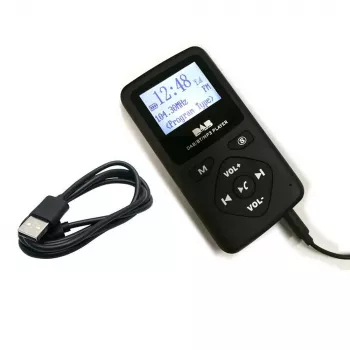
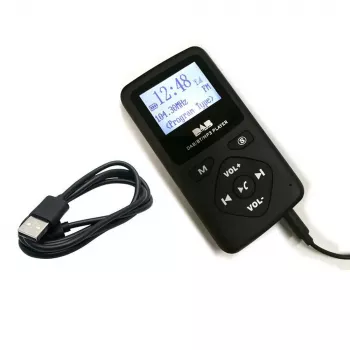
Pocket DAB/DAB+ FM Digital Radio with Bluetooth, MP3 Playback, and an LCD Display
A pocket-size radio can be more than a simple tuner when it combines DAB/DAB+, FM, Bluetooth playback, and MP3 support in a single device. The result is an everyday carry audio option that works for commutes, travel, desk listening, and “just in case” backup use at home. Below is a practical guide to how each feature behaves in real life, what to prioritize, and how to get the best reception from a compact device. For more guidance, see DAB-P9 pocket radio: Some observations and main parts list.
What This Pocket Digital Radio Does
A modern pocket radio is built around flexibility: multiple reception modes for changing coverage, plus playback modes that don’t depend on radio signals at all. A model like the Pocket DAB/DAB+ FM Digital Radio with Bluetooth MP3 Player and LCD Display is designed to keep setup simple while offering several ways to listen. For further reading, see Best DAB radios 2026: the best-sounding digital radios we’ve tested ….
- Combines DAB/DAB+ digital radio and FM reception for different coverage areas and buildings.
- Adds Bluetooth audio so a phone can stream music, podcasts, and audiobooks through the radio’s speaker.
- Includes MP3 playback (when supported via the device’s media input) for offline listening.
- LCD display shows station and playback information at a glance.
- Pocket-friendly form factor for portability and quick station access.
DAB/DAB+ vs FM: What Changes in Everyday Use
DAB/DAB+ and FM each have strengths, and having both makes a pocket radio more dependable when you move between cities, buildings, and travel routes. For a plain-language overview of how DAB works, the WorldDAB explainer is a helpful reference: WorldDAB — What is DAB/DAB+ digital radio?.
- DAB/DAB+ typically provides a station list with names, so browsing feels more like selecting items than tuning frequencies.
- FM can still be the better option in areas with limited DAB coverage or when a building blocks digital reception.
- Digital reception often stays clear until a “threshold,” then turns into dropouts; moving closer to a window can make a big difference.
- FM quality changes gradually (hiss, interference) and often improves with small position or antenna adjustments.
- Local coverage maps help set expectations for indoor listening versus outdoor reliability.
Bluetooth Playback: Streaming From a Phone Without Extra Speakers
Bluetooth mode turns the radio into a compact wireless speaker. That’s useful when earbuds aren’t convenient, or when you want a simple speaker without packing anything else. For deeper technical details, the Bluetooth SIG maintains the standard documentation: Bluetooth Core Specification (Bluetooth SIG).
- Play phone audio through the radio speaker for podcasts while cooking, background music at a desk, or audio on trips.
- Keep the phone within short range and avoid walls and large metal surfaces that can reduce stability.
- If audio stutters, shorten the distance, reduce wireless congestion nearby, and make sure the radio battery is sufficiently charged.
- For shared spaces, lower volume or use headphones if the device supports a headphone output.
MP3 Player Functionality: Offline Listening Without a Data Connection
MP3 playback is the “always available” option—ideal when cell coverage is spotty or when you want to avoid streaming. It’s also a smart choice for language lessons, long audiobooks, or curated music folders that don’t depend on apps.
- Organize files with clear folder names and simple track names for easier navigation on a small screen.
- Stick with common MP3 encoding settings for compatibility; avoid unusual codecs unless the device explicitly supports them.
- If tracks don’t appear, verify the input method (such as the supported media connection) and confirm the file format is supported.
- For troubleshooting, re-export one test track as a standard MP3 and check whether it shows up and plays correctly.
LCD Display and Controls: What Matters Most on a Pocket Device
On a small radio, the display and button layout matter as much as reception. A readable LCD keeps the experience quick—especially when you’re walking, commuting, or using it in low light.
Power, Charging, and Portability
For a compact backup option, consider the Portable Charger 20W PD Fast Charging Power Bank 4800mAh with LED Display—handy for topping up devices during travel and extended outings.
Quick Setup Checklist
Practical Listening Tips for Better Reception
Pocket Radio Specs at a Glance
| Category | What to Check | Why It Matters |
|---|---|---|
| Radio reception | DAB/DAB+ and FM modes | Ensures listening options across coverage areas |
| Wireless audio | Bluetooth playback | Streams audio from a phone without separate speakers |
| Offline playback | MP3 support (input method and formats) | Plays saved audio without internet or mobile data |
| Display | LCD readability and backlight | Quick station info and easier control in low light |
| Portability | Size, weight, and controls | Comfortable pocket carry and simpler operation on the go |
| Power | Charging type and battery behavior by mode | Predictable runtime for travel and backup use |
Who This Radio Fits Best
FAQ
Why does DAB/DAB+ sometimes cut out even when FM works?
DAB/DAB+ audio can drop out when the signal dips below a usable threshold, while FM may still come through with some hiss. Try moving the radio closer to a window, rotating it, adjusting any antenna, and running a fresh station scan in the new location.
How do Bluetooth and radio modes affect battery life?
Bluetooth playback and higher volume typically drain the battery faster than moderate-volume radio listening. For longer trips, keep volume reasonable, recharge regularly, and consider carrying a small power bank.
What should be checked if MP3 files don’t play?
Confirm the radio supports the MP3 format and the specific storage/input method you’re using, and keep folder/track names simple. If files still don’t appear, re-encode a test track as a standard MP3 and try again to rule out codec or tag issues.


Leave a comment