15W 3-in-1 Magnetic Wireless Charger Stand for Daily Use
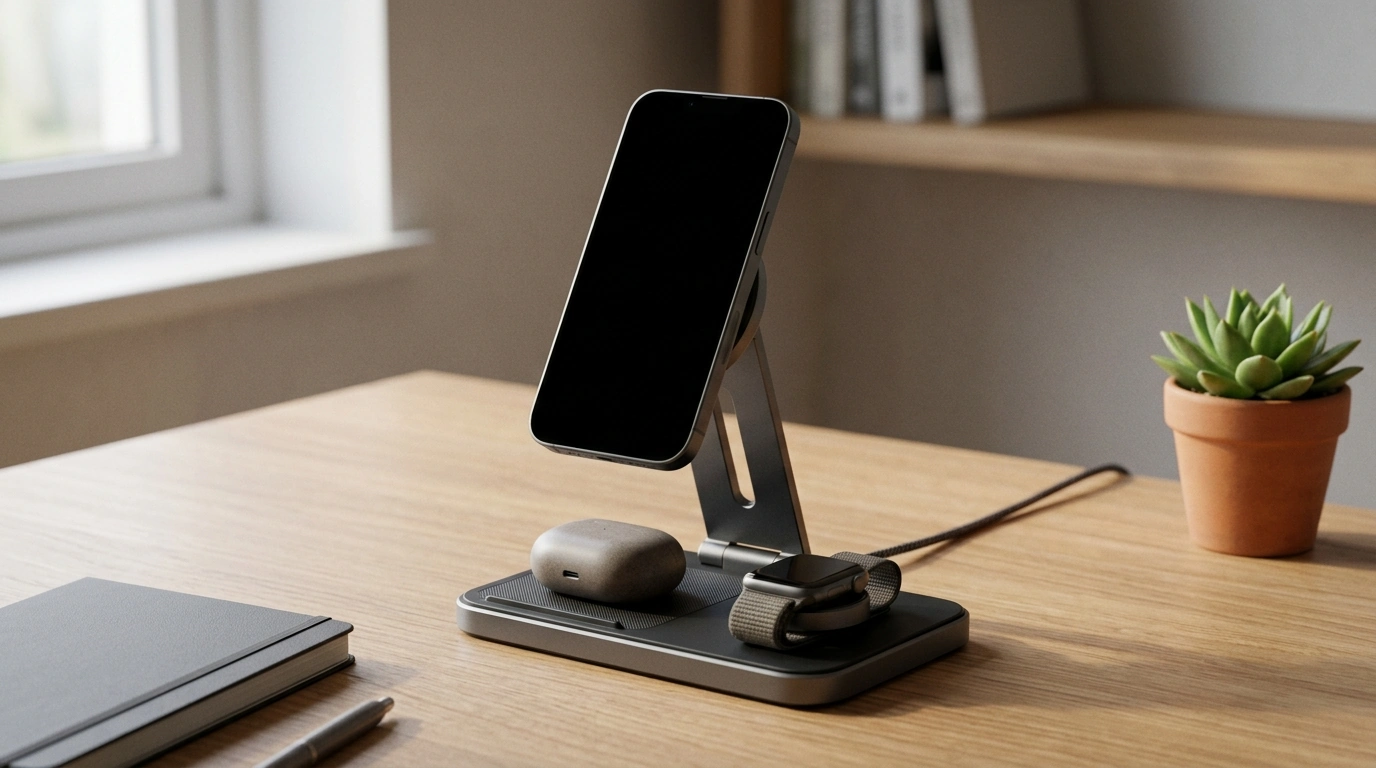
3-in-1 Magnetic Wireless Charger Stand: a fast, tidy charging station for everyday carry
A charging setup should disappear into the background: one place to drop devices, predictable power, and a cleaner desk or nightstand. Our 3-in-1 Magnetic Wireless Charger Stand is built for that routine—MagSafe-style alignment for a phone, plus dedicated spots for the rest of your daily essentials—so cables stop creeping across the room. If you want a single “home base” that makes charging feel automatic, this is the kind of upgrade you notice most when you don’t have to think about it.
What this 3-in-1 stand is designed to solve
Most charging frustration isn’t about speed—it’s about friction. Our team sees the same pain points repeat: too many bricks, not enough outlets, and devices that end up scattered (and half-charged) across the house.
- Replace multiple chargers with one fixed “home base” for daily devices.
- Reduce cable clutter and outlet crowding—one station, one routine.
- Keep your phone visible and usable while charging (messages, calls, timers, standby/clock mode).
- Make charging more consistent with magnetic alignment that helps you land the phone in the right spot.
- Create a travel-friendly setup for hotels or work trips where outlets are limited.
If you’re ready to consolidate, you can start with our 3-in-1 Magnetic Wireless Charger Stand – Fast 15W Charging Station as the main station and keep a single backup cable in your bag for emergencies.
How to fit it into a desk or nightstand setup
Placement is what turns a charging accessory into a charging system. A good station should feel like it “belongs” where you naturally reach, without taking over the surface.
- Desk placement: keep it within arm’s reach so your phone becomes a quick dock between tasks, not a distraction that lives on the desktop.
- Nightstand placement: place it toward the back corner to avoid bumps, with enough clearance to lift the phone off the magnet smoothly.
- Cable management: route the power cable along the back edge of your furniture; a small adhesive clip or sleeve helps keep the run neat.
- Hybrid work: if you charge in two places, matching stations at home and the office eliminates “where’s my charger?” days.
- Sit-stand workstations: docking your phone in a fixed spot prevents it from sliding around when desk height changes—especially useful with a stable surface like our Electric Height Adjustable Standing Desk, 40×24 Inch Sit Stand Desk.
| Location | Best for | Tip |
|---|---|---|
| Desk corner | Workday docking + notifications | Angle the stand so the screen faces your primary seat position |
| Nightstand back edge | Overnight charging | Leave clearance for easy lift-off to avoid pulling the stand |
| Entryway console | Drop zone for coming home | Add a small tray nearby for keys and wallet |
Charging performance expectations (15W fast wireless)
Fast wireless charging up to 15W is ideal for topping up between meetings, keeping your battery stable while you’re using the phone, and making short charging windows actually matter. That said, wireless speeds are always a system: your phone model, coil alignment, case thickness, and the wall adapter you use all influence the result.
- Adapter quality matters: low-output wall adapters can throttle wireless charging even if the stand supports higher wattage.
- Magnetic alignment helps: keeping the coil lined up reduces the “almost charging” problem you can get with standard pads.
- Warmth is normal: wireless charging generates heat; give devices airflow and avoid placing the station on heat-trapping surfaces.
If you want a deeper technical overview of the wireless standard behind most modern charging pads, the Wireless Power Consortium’s Qi overview is a solid reference: Qi Wireless Charging (Wireless Power Consortium).
Compatibility checklist before buying
A 3-in-1 station works best when you’ve already standardized how you charge. A quick compatibility pass now prevents day-one frustration.
For MagSafe behavior and iPhone compatibility basics, Apple’s support hub is helpful: Apple Support: About MagSafe for iPhone.
Daily-use routines that make it feel effortless
3-in-1 station vs. separate chargers
Care, safety, and getting reliable results
For general consumer guidance around wireless devices and safety considerations, the FCC’s information hub is a reliable starting point: FCC: Wireless Device Charging and RF Safety.
FAQ
Will this magnetic stand work with a non‑MagSafe phone?
Yes, as long as your phone supports wireless charging, it can charge on the stand; the magnetic hold is strongest with MagSafe-compatible phones or MagSafe-style cases. For many non‑MagSafe phones, adding a MagSafe-style case or an adhesive magnetic ring improves alignment and docking.
What do I need to get full 15W fast wireless charging?
You’ll get the best results when your phone supports higher wireless wattage, the phone is properly aligned, your case isn’t overly thick, and you use a sufficiently powerful wall adapter with a quality cable. Some phones limit wireless charging wattage by design, so peak speed can vary by model.
Is it safe to use a magnetic charger near bank cards or hotel keys?
It’s best to keep magnetic stripe bank cards and hotel key cards away from the magnet area. Storing cards in a separate wallet pocket (not in the phone case attached to the charger) reduces the risk of demagnetization.



Leave a comment