Captain72: Rapid Trigger Magnetic RGB 72-Key Keyboard
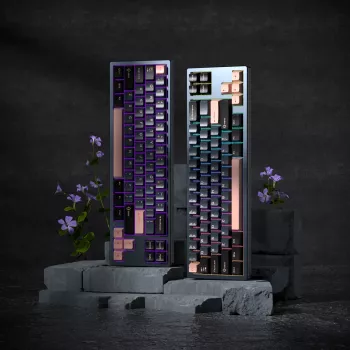

Captain72 is a compact 72-key mechanical keyboard built around magnetic (Hall-effect style) switches and a rapid trigger-style response, aimed at fast inputs, smoother resets, and clean desk setups. With RGB lighting and a smaller footprint than full-size boards, it’s positioned for competitive gaming and everyday typing without the bulk. For more guidance, see Rapid Trigger Keyboard: Everything You Need to Know.
What Makes Captain72 Different
The Captain72 focuses on speed and repeatability while keeping a layout that still feels practical day to day. It trims desk footprint without forcing you into an extreme “tiny board” lifestyle. For further reading, see 9 Best Rapid Trigger Keyboard 2026: Lightning Fast Keys – Eneba.
- 72-key compact layout that keeps essential keys while saving desk space
- Magnetic switch sensing designed for consistent actuation behavior and faster reset potential than many traditional mechanical switch designs
- Rapid trigger-style behavior emphasizes quick key re-engagement for repeated inputs (useful in movement-heavy games and rhythm-like tapping patterns)
- RGB lighting for visibility and personalization
Magnetic Switches and Rapid Trigger Behavior (Plain-English Explanation)
Traditional mechanical switches usually rely on a physical contact closing to register a keystroke. Magnetic switch designs detect movement using a sensor and magnetic field changes (often described as Hall-effect style). That sensor-based approach can reduce contact-related quirks like chatter and can feel more consistent across fast repeats. For background on the sensor principle, see the Hall effect.
Rapid trigger-style behavior is all about what happens during partial releases. Instead of needing the key to travel back to a fixed reset point, the keyboard can treat small up-and-down motions as new, valid inputs more quickly. In practice, that can make repeated taps feel more “instant,” especially in games where you’re constantly feathering movement keys.
- Magnetic switches use a sensor-based method to detect key movement rather than relying only on a metal contact closing; this can improve consistency and reduce chatter-related issues that can happen with contact-based designs
- Rapid trigger-style response focuses on how quickly a key can reset and re-actuate during partial releases, supporting faster repeated presses compared to fixed reset points
- Best-fit use cases: rapid strafing, quick tap inputs, repeated ability keys, and scenarios where small finger movements need to translate into reliable on/off signals
- For typing: a fast reset can feel “eager,” so settings and technique matter—especially if accidental repeats are a concern
Layout, Ergonomics, and Daily Usability
A 72-key format typically lands in the “compact but not cramped” zone. It’s smaller than full-size and many TKL-style setups, but it often keeps arrows and enough navigation functionality to avoid constant frustration. The biggest win is desk geometry: a shorter keyboard can help center your mouse position and reduce reaching, which can matter during long sessions.
- Compact 72-key format balances portability with function—typically keeping arrows and key clusters more often than ultra-small layouts
- Smaller footprint helps center the mouse position and reduce reach, which can be beneficial for long gaming sessions
- Consider desk angle and wrist positioning: pair with a wrist rest if the front height feels tall during long typing sessions
- If switching from full-size: plan new muscle memory for navigation keys and any layer shortcuts
If you’re coming from a 104-key board, the adjustment is usually less about typing letters and more about how you handle Home/End, Print Screen-style functions, and any keys that now live behind a Fn layer. Give yourself a week before deciding it’s “too different.”
RGB Lighting: Practical and Aesthetic Benefits
RGB is often treated as purely cosmetic, but it can be genuinely useful when set up with intent. A simple color zoning approach—one color for movement keys, another for abilities, another for utilities—can reduce mis-presses in dim rooms. For work, a calmer static color can improve readability without pulling attention away from the screen.
- RGB can improve visibility in dim rooms and help identify key groups (movement, abilities, macros) with color zoning
- Lighting effects are most useful when kept consistent: one profile for gaming focus, one for work/typing readability
- If sensitive to bright LEDs, reduce brightness or switch to single-color static modes
Performance Expectations for Gaming and Typing
Gaming feel: quick corrections and repeated inputs
Typing feel: smooth, but potentially reactive
Key Specs at a Glance
| Item | Details |
|---|---|
| Product name | Captain72 Rapid Trigger Magnetic Switch Mechanical Keyboard with RGB |
| Switch type | Magnetic (sensor-based / Hall-effect style) |
| Primary behavior | Rapid trigger-style fast reset and re-actuation |
| Layout | 72-key compact form factor |
| Lighting | RGB |
| Price | $93.17 USD |
| Availability | In stock |
Setup Tips for a Better First Week
In-Stock Picks for a Clean Desk Setup
- Captain72 Rapid Trigger Magnetic Switch Mechanical Keyboard with RGB ($93.17)
- Portable Charger 20W PD Fast Charging Power Bank 4800mAh with LED Display ($26.67)
Who This Keyboard Fits Best
FAQ
What is a magnetic switch keyboard and how is it different from standard mechanical switches?
A magnetic switch keyboard uses a sensor to detect key travel (often described as Hall-effect style) rather than relying purely on a metal contact closing. This can improve consistency and reduce contact-related chatter, and it can also enable rapid trigger-style behavior that responds quickly to small up-and-down movements.
Is rapid trigger behavior only useful for gaming?
It’s most noticeable in gaming because repeated taps and quick directional changes benefit from faster re-actuation. For general use it can feel very responsive, but some typists may need to adjust settings or technique to avoid accidental repeats.
Does RGB lighting affect performance or latency?
RGB primarily affects aesthetics and power draw, and performance impact is typically negligible on modern keyboards. If the lighting feels distracting, lowering brightness or using simpler static modes can improve comfort without changing how the keys respond.





Leave a comment